
Municipal C-Schedule automation
How to populate the C Schedule from the online DynamicAFS platform

Before starting this process, ensure that the correct trial balance, including budgets, is uploaded to the Dynamic AFS platform.
On the portal main menu (below) select ‘MFMA Returns', and then 'C Schedule’. The applicable Schedule will open in a new window.
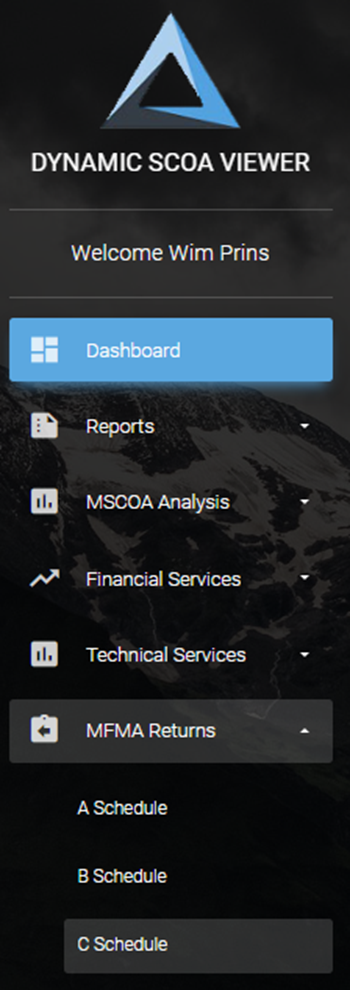
To update the schedule with the figures for the applicable month on the “Ducharme Menu” at the top
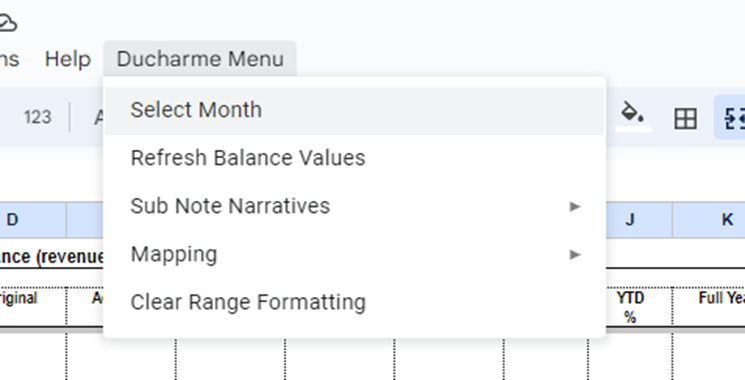
Select the required month on the dropdown model opening
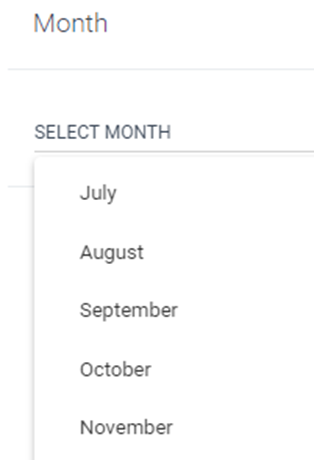
Select the specific month, press OK

Then click on the Ducharme menu again and click on “Refresh Balance Values”. The values will pull through from the AFS to the blue mapped cells.
Hiding of specific rows
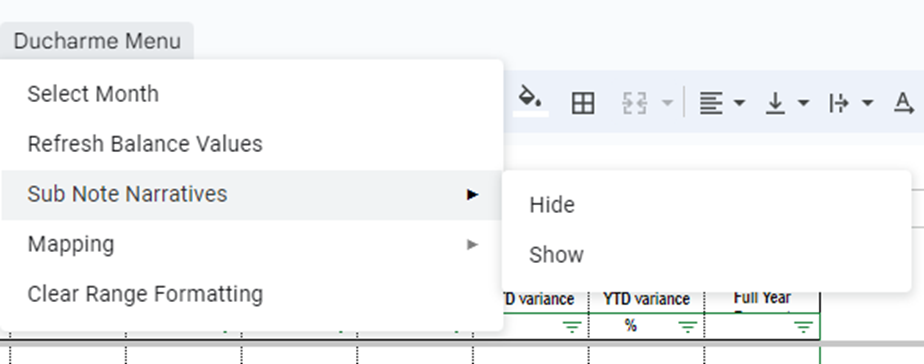
If the municipality wants to hide rows where an item is not applicable to the municipality the cell in column A can be shaded with a colour. When the function on the Ducharme Menu, Sub Note Narratives, Hide is executed all those rows will be hidden.
Shaping of file for printing
When the user is comfortable with the information on the schedule it needs to be downloaded into its original format to be submitted to National Treasury.
First remove the blue shading on the mapped cells by clicking on the Ducharme menu, Select Mapping and then Clear Mapped Cells. (It is best to keep the blue shading on while working on the template).
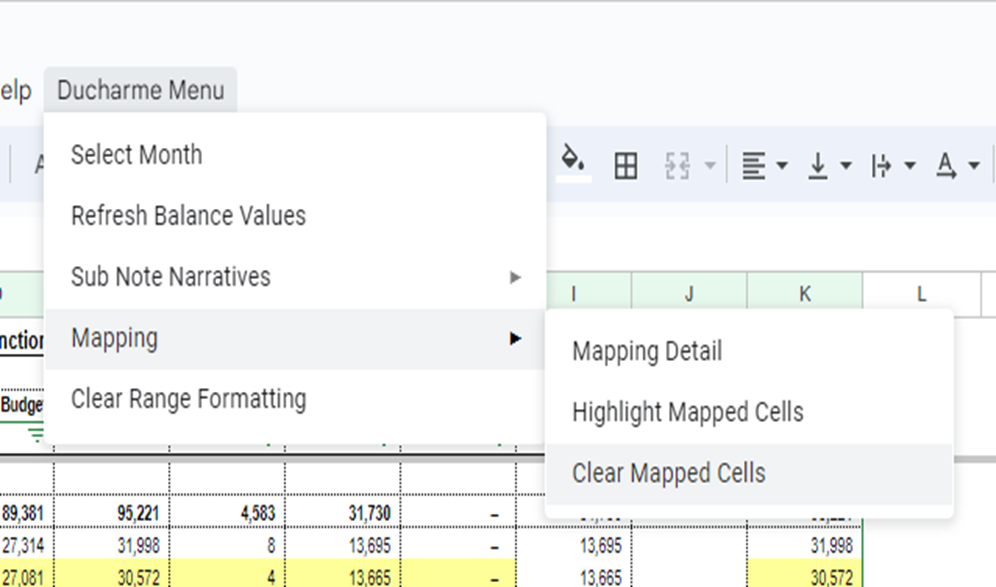
When the blue disappears, download Schedule C to Excel by clicking on File in the top left corner, select Download and then select Microsoft Excel (.xlsx)
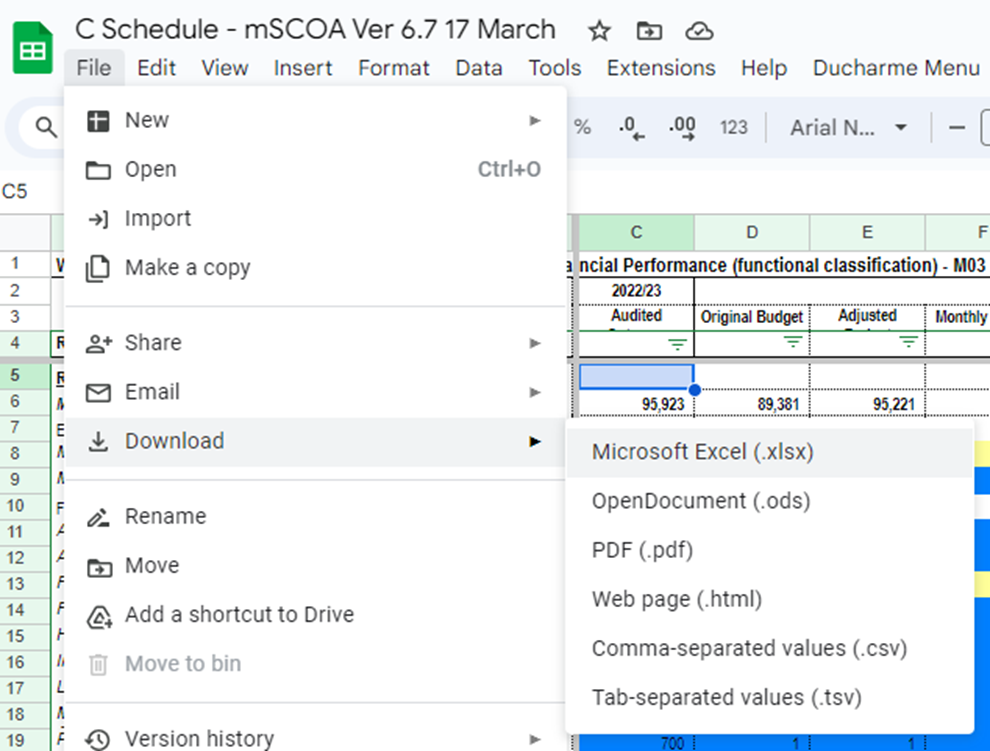
The file will download to the local hard disk, normally in the Downloads folder.
Open the file in Excel and save it in the name format required by National Treasury.
Data considerations
Please note that a combination approach is applicable on the C-Schedules sheets, and include:
Sheets fully automated from the TB data in the system, or
Sheets which include formulas which run from automated data sheets or sheets completed manually by the end users, or
Manually completed sheets by end users.
Only the sections where it is possible to obtain information from the financial statements will update to the schedule automatically. This concerns information from the Statements of Financial Position and Financial Performance.
The following schedules are automated from the system:
C2C | Table C2 Monthly Budget Statement - Financial Performance (functional classification). | |||||||||
C4-FinPerf RE | Table C4 Monthly Budget Statement - Financial Performance (revenue and expenditure). | |||||||||
C6-FinPos | Table C4 Monthly Budget Statement - Financial Performance (revenue and expenditure). | |||||||||
SC6 | Supporting Table SC6 Monthly Budget Statement - transfers and grant receipts (The schedule is currently mapped for the grants applicable at the municipality currently but will need to be maintained to accommodate future changes). | |||||||||
SC8 | Supporting Table SC8 Monthly Budget Statement - councilor and staff benefits (The information for board members of entities on the second halve of the tab will have to be completed manually). | |||||||||
SC13a | Supporting Table SC13a Monthly Budget Statement - capital expenditure on new assets by asset class. | |||||||||
SC13b | Supporting Table SC13b Monthly Budget Statement - capital expenditure on renewal of existing assets by asset class. | |||||||||
SC13c | Supporting Table SC13c Monthly Budget Statement - expenditure on repairs and maintenance by asset class. | |||||||||
SC13d | Supporting Table SC13d Monthly Budget Statement - depreciation by asset class. | |||||||||
SC13e | Supporting Table SC13e Monthly Budget Statement - capital expenditure on upgrading of existing assets by asset class. | |||||||||
The following schedules are formula driven and populates from either:
the above automated sheets or
from manually completed sheets (table 3 below):
C1-Sum | Table C1 Monthly Budget Statement Summary. | |||||||||
C2-FinPerf SC | Table C2 Monthly Budget Statement - Financial Performance (functional classification). | |||||||||
C3-FinPerf V | Table C3 Monthly Budget Statement - Financial Performance (revenue and expenditure by municipal vote). | |||||||||
C5-Capex | Table C5 Monthly Budget Statement - Capital Expenditure (municipal vote, functional classification, and funding). | |||||||||
SC7(1) | Supporting Table SC7(1) Monthly Budget Statement - transfers and grant expenditure. | |||||||||
The following schedules need to be completed manually:
Instructions | The sheet needs to be updated with the current information. | ||||||||
Org structure | This needs to be completed once by the municipality (and updated if there are changes). | ||||||||
Contacts | Contact Information. | ||||||||
C3C | Table C3 Monthly Budget Statement - Financial Performance (revenue and expenditure by municipal vote). (Currently we linked the GFS functions to this page, but it can only be used as such if the municipality uses it as “municipal vote”). | ||||||||
C5C | Table C5 Monthly Budget Statement - Capital Expenditure (municipal vote, functional classification, and funding). | ||||||||
C7-CFlow | Table C7 Monthly Budget Statement - Cash Flow. | ||||||||
SC1 | Supporting Table SC1 Material variance explanations. | ||||||||
SC2 | Supporting Table SC2 Monthly Budget Statement - performance indicators. | ||||||||
SC3 | Supporting Table SC3 Monthly Budget Statement - aged debtors. | ||||||||
SC4 | Supporting Table SC4 Monthly Budget Statement - aged creditors. | ||||||||
SC5 | Supporting Table SC5 Monthly Budget Statement - investment portfolio. | ||||||||
SC7(2) | Supporting Table SC7(2) Monthly Budget Statement - Expenditure against approved rollovers. | ||||||||
SC9 | Supporting Table SC9 Monthly Budget Statement - actuals and revised targets for cash receipts. | ||||||||
SC10 | Not required if municipality does not have entities or this is the parent municipality's budget. | ||||||||
SC11 | Not required if municipality does not have entities or this is the parent municipality's budget. | ||||||||
SC12 | Supporting Table SC12 Monthly Budget Statement - capital expenditure trend. | ||||||||
SC71charts | Some of the graphs populates from the completed schedules but others, like the aging of debtors, needs to be completed manually. | ||||||||